MuscleTrainingTimer

iPhone / iPad · iOS 16.0+

Music stays on.The cues keep pace.

An interval timer for HIIT, Tabata and circuit routines you build yourself. More than 50 sound cues mark each phase without stopping your music.

Download on the App StoreFree (with in-app purchases)

Scan with your iPhone

MuscleTrainingTimer

When it helps

What it does

  1. 01

    Build your routine

    Combine several exercises into one routine, with rounds and rest between blocks. Ladders like 21-15-9 work too.

  2. 02

    50+ sound cues

    Per-second ticks, interval signals, countdown and finish cues, each of which can be switched on or off.

  3. 03

    Plays over your music

    Cues play on top of Apple Music, Spotify or podcasts without stopping them, even with the screen locked.

  4. 04

    Time left on the Lock Screen

    Live Activity and Dynamic Island show the current phase and the time remaining.

  5. 05

    26 color themes

    Pick a theme or build your own palette, and choose a ring or linear layout.

  6. 06

    Share and log

    Share routines by QR code or link. Log sets with weight, reps and notes, and sync them to Apple Health.

In detail

01

Build one routine from several exercises

Combine multiple exercises into a single routine, with rounds and rest between blocks. Cooldown periods and per-block notes are supported as well.

  • Rest between rounds and blocks
  • Ladders, reps-based and time-based intervals
  • Ready-made presets
02

Stay on pace with 50+ sound cues

Choose from more than 50 sounds, including per-second ticks, interval signals, countdown and finish cues. Each sound can be switched on or off, and spoken cues can announce "Work", "Rest" and more.

  • Plays over your music
  • Keeps playing with the screen locked
  • Haptic feedback
03

See the phase and time on the Lock Screen

Live Activity and Dynamic Island show your current phase and remaining time on the Lock Screen. Live Activities are a Pro feature.

  • Live Activity
  • Dynamic Island
04

Make it look the way you like

Pick from 26 color themes or build your own palette. You can also switch between ring and linear layouts, solid or glass backgrounds, and adjust the spacing.

  • 26 color themes
  • Custom palette
  • Ring or linear layout
05

Find, share and log your routines

Search the full text of your routines, mark favorites and sort by usage, created or updated date. Share a routine by QR code or link, and log sets with weight, reps and notes that sync to Apple Health.

  • Share by QR code or link
  • Save your own templates
  • Reminders on days and times you choose

How it works

  1. 1

    Start with a preset

    The core timer is free to use. Tap the start button with the preset values to begin.

  2. 2

    Build a routine

    Set up exercises, rounds and rest, then combine them into one routine. Multi-block workouts are a Pro feature.

  3. 3

    Run it with start, pause and skip

    Start, pause, resume and reset, or skip to the next phase and step back to the previous one.

  4. 4

    Share and log

    Share a routine by QR code or link. You can log sets with weight, reps and notes, and Apple Health sync is a Pro feature.

Screens

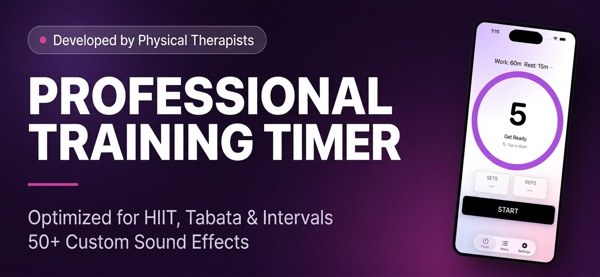
The ring-style timer screen

FAQ

Is the app free to use?

The core timer is free. Pro adds unlimited menus, multi-block workouts, Live Activities, custom themes, Apple Health sync, voice control, reminders and more. Pro is available monthly, yearly or as a one-time lifetime license.

Can I use it while listening to music?

Yes. Sound cues play on top of Apple Music, Spotify or podcasts without stopping them.

Does it keep playing when the screen is locked?

Yes. Playback continues in the background with the screen locked.

What permissions might the app ask for?

It may ask for permission when you use a related feature. Camera is used to scan QR codes of shared workout menus, Photos (add only) to save a sharing QR code, Microphone and Speech Recognition for voice commands such as Start and Pause, and Apple Health to save and view your workout records.

What gets saved to Apple Health?

Sets you log with weight, reps and notes are synced to Apple Health automatically. This sync is a Pro feature.

Can I control it by voice?

Yes. It supports the voice commands "Start", "Pause" and "Reset", as well as Siri Shortcuts. Voice control is a Pro feature.

Can I share a routine with someone else?

Yes, by QR code or link. You can also save your own templates.

Which iOS version does it require?

iOS 16.0 or later.

Let the cues call the next round.

Download on the App Store
MuscleTrainingTimerGet